 BinaryConstruct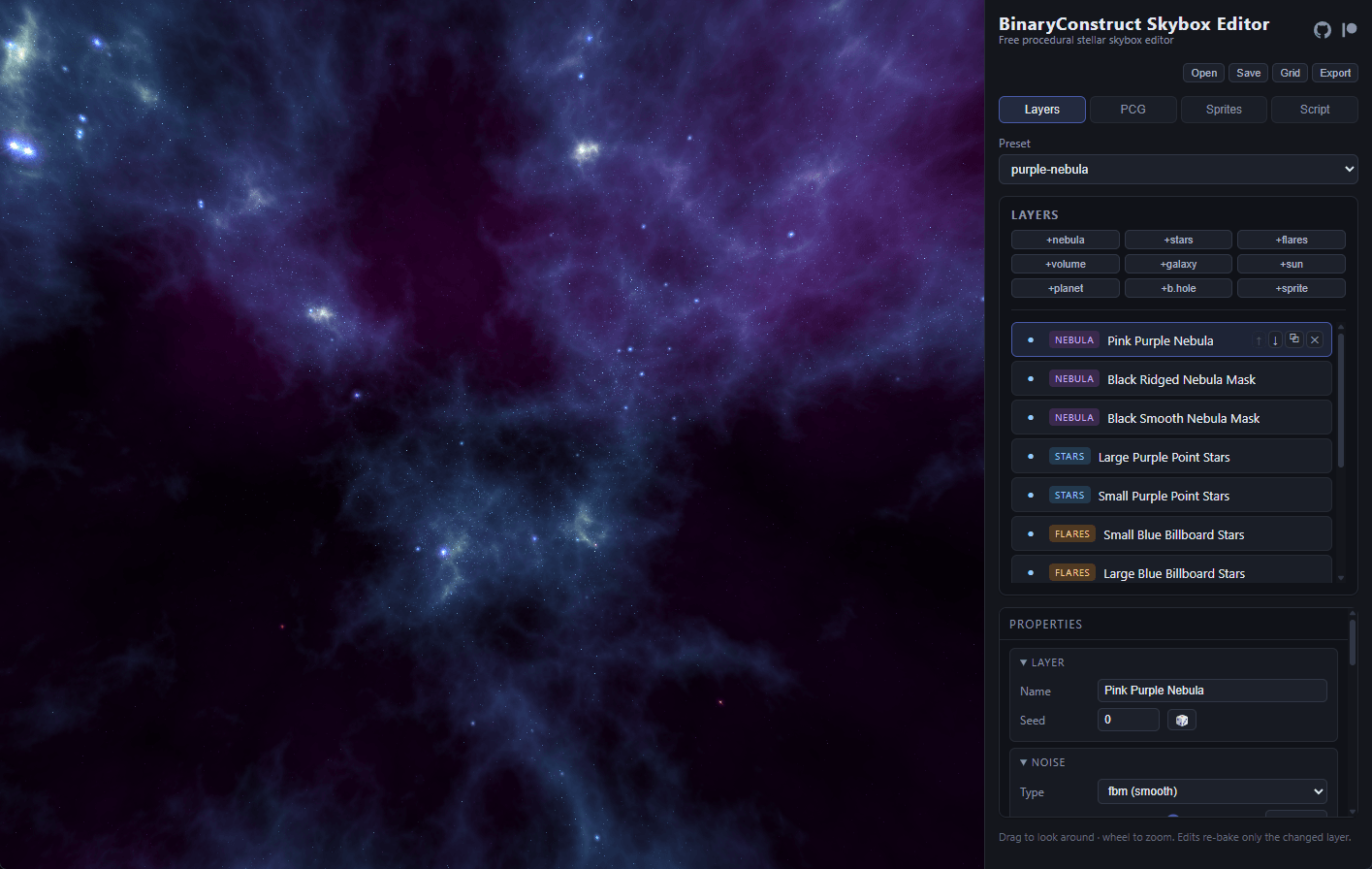
I built the BinaryConstruct Skybox Editor because I wanted a modern replacement for Spacescape that I could open in a browser, use without an account, and export directly into a game project. It is a TypeScript, React, three.js, and WebGL2 application with a procedural layer stack, deterministic generation, and high dynamic range (HDR) cubemap export.
The black hole layer became the most technically involved part of the editor. It does more than place a dark circle and an orange ring on the sky. Light from the existing scene bends around the hole, the accretion disc produces direct and secondary images, and the two sides of the disc shift in color and brightness based on their motion relative to the camera.
The editor runs at skyboxeditor.com, and the complete MIT-licensed source is available in the BinaryConstruct Skybox Editor repository.
A procedural layer stack
The editor uses the same basic model as an image editor: each scene is an ordered stack of layers. The difference is that most layers generate their content from parameters and a seed instead of loading a flat bitmap.
The current layer types cover:
- Seeded Perlin and ridged-noise nebulae
- Point-based star fields with spectral colors and procedural flares
- Volumetric nebulae rendered from noise cubemaps
- Galaxies, suns, planets, and user sprites placed on the sky sphere
- Schwarzschild black holes that lens the layers behind them
The rendering code is split between React for the editor, three.js 0.185.1 for scene management, and custom GLSL for the procedural and lensing work. TypeScript 6.0.2 keeps the layer model, renderer, serializer, and editor controls working from the same set of types.
Determinism is part of the file format, not an optional feature. Generation never calls Math.random. Every procedural layer uses seeded MsvcRng or PerlinNoise streams, and new random sequences get their own seed offsets so an older scene does not change when I add another feature. That means a committed scene can be reopened later and render the same stars, clouds, and generated sprites.
Rendering a black hole
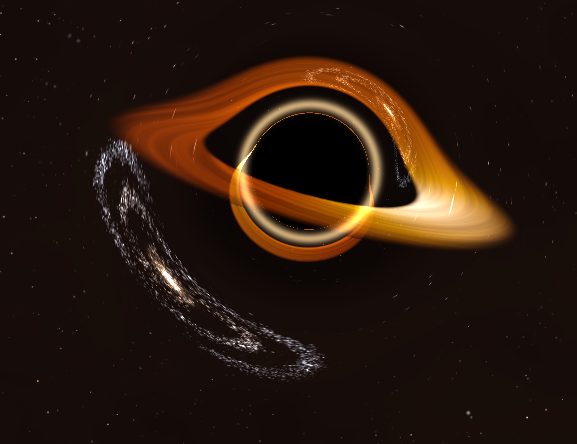
The accretion disc is not a tilted mesh drawn in front of the shadow. It is evaluated inside the lens shader from a second lookup texture containing sampled geodesic trajectories. For each pixel, the shader computes where that ray’s orbital plane crosses the disc plane, then looks up the radius of the ray at each crossing.
Those crossings produce the characteristic structure described by Jean-Pierre Luminet’s 1979 work: the near side passes in front of the shadow, the far side bends into the bright shape above it, and a secondary inverted image sits close to the photon ring. Changing the disc tilt changes the geometry instead of stretching a painted texture. The crossing and shading code starts at src/render/blackHoleLayer.ts:82.
The disc shading combines several effects:
- Temperature falls with radius using
T(r) proportional to r^-0.75 - Orbital speed follows a Keplerian approximation
- Relativistic Doppler shift changes the observed color temperature
- Doppler beaming makes the approaching side brighter than the receding side
- Gravitational redshift reduces energy close to the hole
- Radius-twisted fractal noise creates streaks that follow differential rotation
The shader converts the resulting temperature through a blackbody lookup table rather than blending between arbitrary orange and blue colors. A soft tone-mapping shoulder keeps the bright side from clipping to featureless white. The same model is also used by the CPU procedural-content baker in src/gen/anomalyGen.ts:192, so a generated black hole sprite and a live lens layer share the same visual rules.
The renderer is intentionally narrower than a general relativity simulator. It models a non-spinning Schwarzschild black hole and a thin analytic disc. It does not model Kerr frame dragging, magnetohydrodynamics, or time-varying plasma. Several controls remain artistic because the output still has to work as game art. The light paths and disc images come from the geodesics, while exposure, disc extent, temperature, and ring visibility remain adjustable.
Testing the math
Visual inspection is useful, but it is easy to make an incorrect black hole that still looks convincing. I added tests around the parts that have known behavior in src/gen/geodesic.test.ts:4.
The tests check that:
- Large impact parameters match the second-order weak-field deflection formula
- Rays below the critical impact parameter are captured and rays above it escape
- Deflection decreases as impact parameter increases
- Rays near the photon ring bend more strongly than the weak-field approximation predicts
- Lookup textures contain finite values and preserve the expected ordering
These tests caught mistakes that a screenshot would not, especially sign errors and finite-camera approximations that only become obvious when compared against the analytic weak-field result.
Sources that informed the renderer
I used several references while working out the geometry and shading:
- Jean-Pierre Luminet’s 1979 paper, Image of a Spherical Black Hole with Thin Accretion Disk, for the direct and secondary disc images, observed intensity, and the asymmetric appearance caused by motion
- HollowaySean/BlackHoleViz_v2, a Unity black hole visualizer, for practical notes on Schwarzschild integration, adaptive stepping, disc temperature, Doppler shift, gravitational redshift, and disc density
- hexontos/rendering-black-hole, a TypeScript and WebGPU renderer, for a compact planar geodesic formulation suited to a shader-oriented implementation
- Alex Peterson’s original Spacescape, which established the procedural, seeded layer workflow that inspired the editor as a whole
I re-derived and adapted the equations for this renderer rather than copying one implementation. The result had to support both a live WebGL2 lens and a deterministic CPU sprite baker, which led to the shared integrator and lookup-table approach.
Exporting the result
The preview and export paths use the same layer model. A scene can be exported as six cubemap-face PNG files, an equirectangular image, Radiance HDR, or OpenEXR. The export renderer bakes the layer stack into a half-float cubemap before converting it to the requested format. Per-layer image export, star data, and batch seed variations are available for pipelines that need more than a single flattened sky.
Scenes are stored as JSON and can be edited directly in the Script tab. The schema is generated from the same field definitions used by the loader, which avoids maintaining a separate description of the format. The published scene schema also makes it practical to generate, validate, diff, and version skyboxes outside the editor.
Everything runs locally in the browser. There is no account system, server-side renderer, or scene upload step. Open the BinaryConstruct Skybox Editor, add a black hole layer, and place a galaxy behind it. The lens will do the rest.